Your data
Konflux keeps what it knows on your computer: your settings, a log of every chat you open, your notes, and your sign-ins in the system keyring. It has no telemetry, analytics or crash reporting. The only Konflux servers it contacts are the update check and, when you sign in to Kick, the sign-in helper, which keeps nothing. Two defaults matter most: the chat log keeps everyone’s messages forever until you change Keep messages for, and Read Twitch chat as your own account is on, so you appear in the chatter list of every Twitch channel you open.
This page describes the tester version of Konflux as of 29 September 2026.
At a glance
Section titled “At a glance”- On your computer: settings, your tabs and streamers, the chat log (with your notes and nicknames), records you save, and the window’s browser data.
- In your system keyring: your Twitch, YouTube and Kick sign-ins, and your Pogly token if you use Pogly.
- Sent to Twitch, YouTube and Kick: which chats you open, what you send, the moderation you do. YouTube and Kick chat are read without your account.
- Sent to other services: the emote services 7TV, BetterTTV and FrankerFaceZ learn which channels you open. A third-party service provides recent messages when you open a Twitch chat. Pogly, if you connect it.
- Sent to Konflux: the update check; and if you sign in to Kick, that sign-in and its renewals, through a helper that keeps nothing.
- Sent nowhere: your notes and nicknames. The chat log leaves your computer only if you set up the archive sync, which is off.
What Konflux keeps on your computer
Section titled “What Konflux keeps on your computer”Files in your config folder
Section titled “Files in your config folder”Konflux keeps its files in ~/.config/konflux/, or in $XDG_CONFIG_HOME/konflux/ if that variable is set on your system; on Windows in %APPDATA%\konflux\. They are ordinary files, which you can back up.
| File | What it holds |
|---|---|
settings.json |
The settings you changed. A setting you never touched is not written down. |
layout.json |
Your tabs and splits. |
people.json |
The streamers and people you added or linked, and the names you gave them. |
accounts.json |
Who is signed in: platform, account ID, name, the permissions granted and when the sign-in runs out. No passwords and no tokens. |
log.sqlite |
The chat log, described below. While Konflux runs, two helper files sit beside it: log.sqlite-wal and log.sqlite-shm. |
forgotten.json |
The people you have forgotten, so that nothing new of theirs is kept. It appears once you forget someone. |
node-id |
A random ID for this installation, made on the first start. It says nothing about you, and it is only ever sent with the archive sync. |
youtube-quota.json |
How much of YouTube’s daily sending budget has been spent today. |
evidence/ |
Records you saved with Save record on a person’s card. |
backups/ |
A copy of your setup, made before every import. |
forget-pending.json |
Only with a log server: forgets that have not reached it yet. |
Konflux also reads some files that it never writes, if someone puts them there by hand: sign-in details that replace the built-in ones (twitch-client-id, youtube-oauth-client-id, youtube-oauth-client-secret, kick-client-id, kick-client-secret), a YouTube API key (youtube-api-key), and the log server credentials (sync-token, purge-token). A normal installation has none of them.
Where the rest of Konflux’s files go, and how to remove them, is on Install and update.
The chat log
Section titled “The chat log”The log is log.sqlite. Konflux writes every chat you have open into it as the chat arrives:
- every message: its text, the author’s account ID and name, the time and the badges;
- deletions, timeouts and bans. A deleted message is marked as deleted, not removed;
- events such as subs, gifts, raids and announcements, and, in channels you moderate, messages AutoMod held and Twitch’s suspicious-user flags;
- a copy of each item exactly as the platform sent it, with this installation’s ID and, when you read Twitch as yourself, which of your accounts saw it and your role in that channel.
Your notes about people, and the nicknames and colours you give them, are in the same file.
The log holds other people’s messages: everyone in every chat you open. It stays on your computer unless you set up the archive sync.
Person cards, search, notes, nicknames, saved records and older messages when you scroll up all read from it.
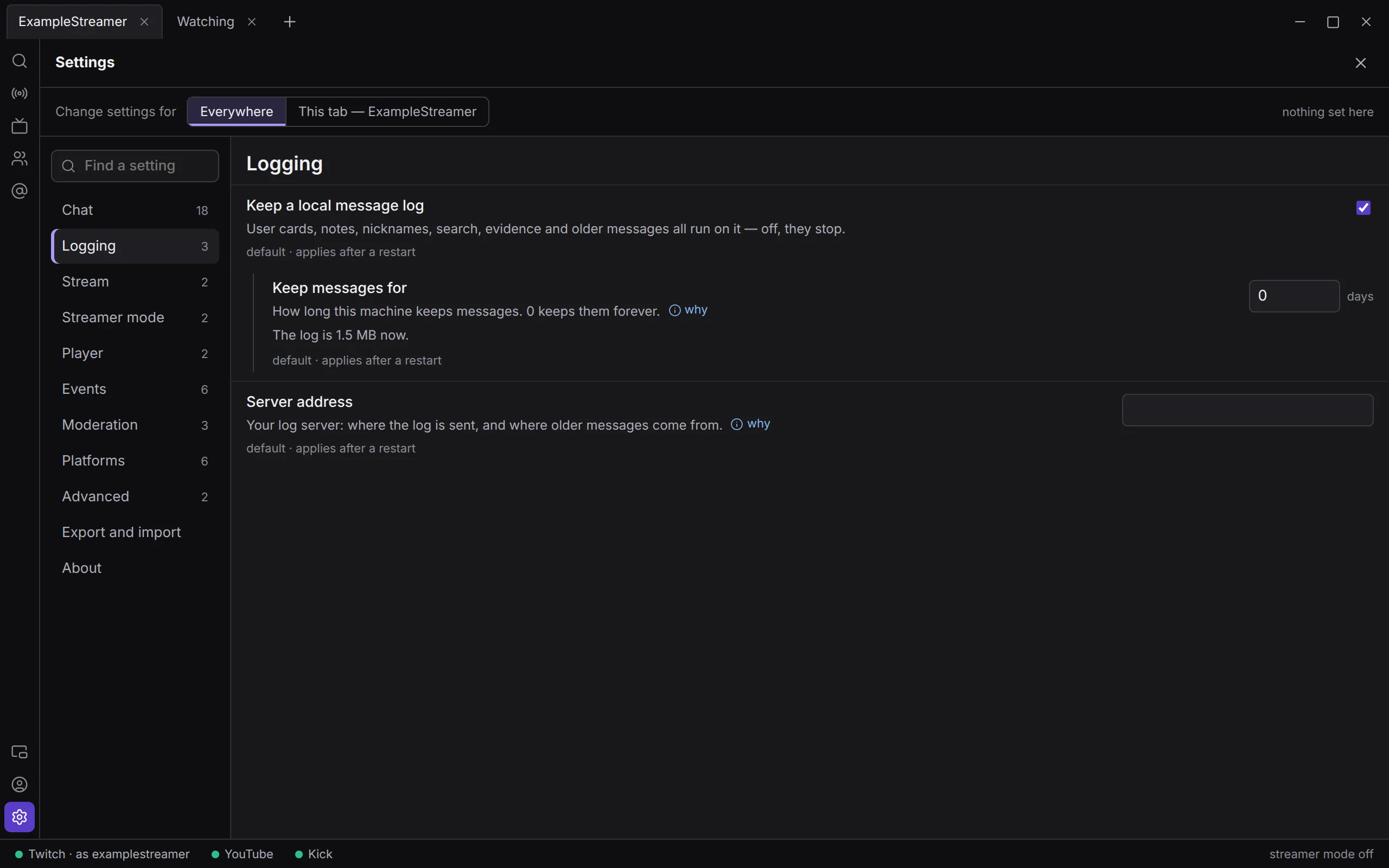
How long it is kept. Keep messages for in Settings › Logging is 0 by default, which keeps messages forever. Set a number of days and Konflux deletes older messages, moderation records and platform copies when it starts and once a day after that. Your notes and nicknames are not deleted by it. Under the setting, Settings says how large the log is now: “The log is … now.” A change applies after a restart.
Chat that came through YouTube’s official API is deleted after 29 days, because YouTube’s rules allow 30. Konflux reads YouTube that way only as a fallback, so most logs hold none.
Turning the log off. Keep a local message log (Settings › Logging, on by default) turns logging off after a restart. As its help says: “User cards, notes, nicknames, search, evidence and older messages all run on it — off, they stop.” Turning it off keeps the log that is already there. To delete it, close Konflux and delete log.sqlite and its two helper files. Your notes and nicknames go with them.
Forgetting a person
Section titled “Forgetting a person”When someone asks you to stop keeping their chat, you can remove everything Konflux keeps about them. The tool is behind Developer mode, so that it is not one click away for everyone.
- Turn on Settings › Advanced › Developer mode (off by default).
- Open the person’s card and click Forget this person….
- Konflux counts what it keeps and says what will go: “This removes, now: …”, for example their messages, archived records, moderation records, notes, nicknames and quotations in other people’s replies.
- Type their name into the box labelled Type name to confirm, and click Forget.
What happens:
- Everything counted leaves the log at once. Their entry in your people list goes too, and so do records you saved about them, unless you tick Keep their evidence record — only if a law requires it (it counts them when there are several).
- Their account goes on the do-not-keep list: “From now on nothing new of theirs is kept.”
- A sealed copy is kept for seven days, in case it was the wrong person. It is in
~/.cache/konflux/held/, outside the config folder, so a backup of your settings does not carry it. Undo it from the card (“Can be undone until …”, Undo) or from Settings › Forgotten people, which is there while Developer mode is on. After seven days Konflux destroys the copy. It checks when it starts and every hour while it runs. - Forgetting goes by account ID, because names change and get reused. If the card knows only a name, Konflux takes the newest account this computer heard using it. For Twitch it can ask Twitch who holds the name now, and the confirmation says which it found.
With a log server and its purge credential, forgetting also removes the person from the server. See The chat archive sync.
Sign-ins, in your system keyring
Section titled “Sign-ins, in your system keyring”Your Twitch, YouTube and Kick sign-ins are kept in the system keyring, never in a file. On Linux that is the keyring your desktop offers through the Secret Service, such as KDE Wallet or GNOME Keyring. Each sign-in is one entry, and its name contains @konflux, for example twitch:<account ID>@konflux. Your Pogly token is another entry there, stored together with the overlay it belongs to.
sign out in the Accounts panel deletes Konflux’s copy of a sign-in. As the panel says, withdrawing Konflux’s access completely is done on the platform’s own settings page. More on Accounts and signing in.
The window’s browser data
Section titled “The window’s browser data”The window is a browser engine, and it keeps its own data in ~/.config/konflux-desktop/ (on Windows %APPDATA%\konflux-desktop\):
- the cookies and sign-ins of the platform pages you open inside Konflux (the native drawer, and Twitch’s own viewer card), and of Pogly’s editor. Each is kept apart from the rest of Konflux;
- a cache of pictures. Twitch, YouTube and Kick pictures are cleared when Konflux starts and once a day, because Twitch’s and Kick’s rules allow keeping them for 24 hours. 7TV, BetterTTV and FrankerFaceZ pictures stay cached;
- your recently used emotes, and which one-time notes you have dismissed;
While an update downloads, a hidden file ending in .part sits beside the AppImage.
What Konflux prints, and a report
Section titled “What Konflux prints, and a report”While it runs, Konflux keeps the last lines it has printed — about 2,000, with their times — in memory, and writes them nowhere. They name the channels you open and the accounts you use; they hold no chat messages, tokens or passwords. When you press Save a report… in Settings › About, Konflux shows you the report, those lines with it, and saves it only when you press Save…, where you choose. It never sends a report anywhere. When Konflux closes, the lines are gone.
What Konflux connects to
Section titled “What Konflux connects to”Every fixed address below is reached over an encrypted connection. Like any connection, each one shows the other side your internet address. “Your token” means your sign-in for that platform, and it is sent only to that platform.
Twitch
Section titled “Twitch”| Host | Why | When | What is sent |
|---|---|---|---|
irc-ws.chat.twitch.tv |
Reading Twitch chat. | While any Twitch chat is open. One connection carries them all. | The channel names. With Read Twitch chat as your own account on and a Twitch sign-in: your account name and your token. Otherwise an anonymous guest name. |
api.twitch.tv |
Twitch’s official API: sending, moderating, badge and cheer pictures, whether a channel is live, facts on a person’s card (account age, and follows and subscriptions where Twitch allows), who is in the chat, importing who you follow. | When you do these things. Badges and cheers at start, when a chat opens and once a day. Live state when the Live panel opens, and once a minute for the stream strip. | Your token, Konflux’s app ID, and what the request is about: a channel, an account, a message. Nothing is asked without a Twitch sign-in. |
eventsub.wss.twitch.tv |
Messages AutoMod holds, and Twitch’s suspicious-user flags; and raids the Twitch channels you have open send, so the chat can say where the viewers went. | The first only in channels where you are a moderator; the raids for every Twitch channel open, up to about ten. Both only while signed in to Twitch. | Your token and those channels. |
id.twitch.tv |
Signing in with a code, and renewing and checking the sign-in. | When you sign in, and when the sign-in needs renewing. | Konflux’s app ID, the sign-in code, and your renewal token. |
recent-messages.robotty.de |
Recent messages, so that a Twitch chat does not open empty. A third-party service. | Each time a Twitch chat opens, while Show recent messages when opening a Twitch chat is on (default). | The channel’s name and how many messages to return. No account. |
www.twitch.tv |
The native drawer and Twitch’s own viewer card are Twitch’s own pages. | When you open them. | What any browser sends Twitch. These pages have their own cookies and sign-in. |
YouTube
Section titled “YouTube”| Host | Why | When | What is sent |
|---|---|---|---|
www.youtube.com |
Reading YouTube chat; finding a channel’s live stream; whether a channel is live; the native drawer. | While a YouTube chat is open: at least every 2 seconds (Check YouTube chat at least every, 2000 ms). While a channel is not live: once a minute, to see whether it has started. | The video ID, YouTube’s own marker for where the chat has got to, and a fixed description of a web browser in English. No account and no cookies: see Reading YouTube without an account. The drawer is YouTube’s own page, with its own cookies. |
www.googleapis.com |
YouTube’s official API: sending, moderating, finding your channel when you sign in, importing your subscriptions. | When you do these things. | Your token, and what the request is about. |
accounts.google.com |
Google’s consent page, in your own browser. | When you sign in. | Handled by your browser and Google. |
oauth2.googleapis.com |
Finishing and renewing the Google sign-in. | When you sign in, and when the sign-in needs renewing. | Konflux’s app ID and secret, the one-time code, and your renewal token. |
A copy of Konflux that has a youtube-api-key file also uses that key with www.googleapis.com: to find a stream’s chat ID, which bans need, and to read chat the official way when the normal reader cannot.
| Host | Why | When | What is sent |
|---|---|---|---|
ws-us2.pusher.com |
Reading Kick chat, through the real-time service Kick’s own website uses. | While a Kick chat is open. | The chat room’s number. No account. |
kick.com |
Looking up a channel: its chat room, its room settings and its subscriber badges. Whether it is live. The native drawer. | When a Kick chat opens; with the Live panel and the stream strip; badges again once a day. | The channel’s name, with a description of a web browser. No account. The drawer is Kick’s own page. |
api.kick.com |
Kick’s official API: sending, moderating, finding your account when you sign in. | When you do these things. | Your token. |
id.kick.com |
Kick’s sign-in page, in your own browser. | When you sign in. | What you type into Kick’s page goes to Kick only. |
auth.konflux.app |
Konflux’s sign-in helper for Kick. Kick requires an app secret to finish a sign-in and to renew it, and an app on your computer cannot keep one, so the helper adds it and passes Kick’s answer back. | When you sign in to Kick, and when that sign-in is renewed. | The one-time code from the sign-in, or your renewal token. Your Kick login passes through it on its way back to Konflux. The helper keeps none of it. |
Emotes
Section titled “Emotes”| Host | Why | When | What is sent |
|---|---|---|---|
7tv.io |
7TV emotes, on all three platforms. | The global emotes at start. A channel’s own when its chat opens. All of them again once a day. | The channel’s public ID on its platform, and Konflux’s name and version. |
api.betterttv.net |
BetterTTV emotes, for Twitch and YouTube channels. | As above. | As above. |
api.frankerfacez.com |
FrankerFaceZ emotes, for Twitch channels. | As above. | As above. |
Pictures
Section titled “Pictures”Emote, badge and cheer pictures come from the addresses the platforms and emote services name, for example static-cdn.jtvnw.net (Twitch), yt3.ggpht.com (YouTube), files.kick.com (Kick), cdn.7tv.app, cdn.betterttv.net and cdn.frankerfacez.com. The window fetches a picture when a message needs it. The request is for that picture, from the window’s own browser session, which is kept apart from the platform pages you sign in to inside Konflux.
Konflux, Pogly and the rest
Section titled “Konflux, Pogly and the rest”| Host | Why | When | What is sent |
|---|---|---|---|
updates.konflux.app |
The update check. | Only in an installed AppImage: a minute after start and then daily, while Check for updates is on (default), and whenever you click Check now. | A request for the list of releases and its signature, and, if there is a newer version, the new AppImage. Nothing about you or your accounts. |
maincloud.spacetimedb.com |
Pogly’s API: checking your token, listing your scenes, switching, creating, renaming, copying and deleting them. | Only if you use Pogly: when the Pogly panel opens, and when you act in it. | Your Pogly token and your overlay’s ID. See Pogly. |
cloud.pogly.gg, or your overlay’s own pogly.gg address |
Pogly’s editor, in a window of its own. | When you click Open editor. | What any browser sends Pogly. |
| Your log server | The archive sync. | Only if you set it up. It is off. | See The chat archive sync. |
Pages that are websites. The native drawer, Twitch’s viewer card and Pogly’s editor are those services’ own web pages, shown inside Konflux. They load whatever their site loads, with their own cookies, and a sign-in there is known to that site. Konflux keeps them to their own sites and the sign-in pages they need (Google’s consent pages, Pogly’s sign-in service auth.spacetimedb.com, Twitch’s passport.twitch.tv). A link anywhere else opens in your browser. They may copy to your clipboard and go full screen. They cannot use your camera, microphone, location or notifications.
Players. Watch in a player in a split’s header starts streamlink, or mpv with yt-dlp: programs you install yourself, which fetch the stream from the platform. Konflux gives them only the channel’s address, and streamlink the quality.
Links in chat open in your own web browser.
How this list was made
Section titled “How this list was made”On 29 September 2026 the app’s source code was searched for every web address and host name, in the part that talks to the platforms, in the window, and in the pages it shows. Test code and developer tools that are not part of the app were left out. The search found 30 host names written into the code. Three more appear only in the lists of pages that embedded windows may visit. Two picture hosts are named by the emote services’ answers rather than by Konflux. That is 35 in all, plus your own log server if you set one. A 36th, Google’s spelling-dictionary server, is built into the browser engine; Konflux turns spell checking off, so it is not contacted. Twitch, YouTube and Kick can name other picture hosts in their answers.
Konflux’s servers and the GDPR
Section titled “Konflux’s servers and the GDPR”Konflux contacts two servers of its own: the update check at updates.konflux.app, and, when you sign in to Kick, the sign-in helper at auth.konflux.app (see What Konflux connects to). This is what the EU’s data protection regulation, the GDPR, asks you to be told about them.
Who is responsible: the person named in the legal notice on konflux.app, who you can reach at contact@konflux.app.
What they receive:
- The update check: your internet (IP) address, the time, the files asked for (the list of releases, its signature, and a new version when there is one), and what Konflux sends with every request, such as the name of the program asking. Nothing about you or your accounts.
- The sign-in helper: the same connection details, and what Kick needs to finish or renew a sign-in: the one-time code from Kick’s page and the check Konflux made for it, or your renewal token. It adds Konflux’s app secret, passes the request to Kick, and hands Kick’s answer, your Kick login, back to Konflux.
Why: the update check keeps Konflux up to date and safe, and the helper signs you in to Kick when you ask it to. Both are a legitimate interest, the legal basis under Art. 6 (1) (f) GDPR.
Who processes it: Cloudflare, Inc. runs both servers on Konflux’s behalf, the update check on Cloudflare R2 and the helper on Cloudflare Workers, under its data processing addendum (Art. 28 GDPR). Cloudflare is a US company. It is certified under the EU–US Data Privacy Framework, on which transfers to the US rest (Art. 45 GDPR). The helper passes your sign-in to Kick, which handles it as it handles any sign-in to Kick, under its own privacy policy.
How long: neither server keeps anything of its own. The update check writes no logs, and the helper keeps no copy of what passes through it and has its logging switched off. How long Cloudflare keeps connection details is set out in Cloudflare’s privacy policy.
Do you have to: no. Check for updates can be switched off in Settings › Advanced, and Kick chat can be read without signing in. Without your internet address, neither server can answer you.
Your rights:
- to know what is kept about you (Art. 15 GDPR), and to have it corrected (Art. 16) or deleted (Art. 17);
- to have its use restricted (Art. 18), and to receive it in a form you can take elsewhere (Art. 20);
- to object, at any time, to its use on the basis of a legitimate interest (Art. 21);
- to complain to a data protection supervisory authority, for example the one where you live (Art. 77).
To use them, write to contact@konflux.app.
Telemetry, analytics and crash reports
Section titled “Telemetry, analytics and crash reports”There are none.
The check: the code and its lists of outside libraries were searched for telemetry, analytics and crash-reporting libraries and words, such as Sentry, crash reporters, analytics, beacons, Mixpanel, PostHog, Amplitude, Bugsnag, Datadog and OpenTelemetry. Nothing was found. At run time, the window uses two outside libraries, Svelte and Electron. Electron keeps a local crash folder, but Konflux never starts its crash reporter and names no address that reports could be sent to.
Reading YouTube without an account
Section titled “Reading YouTube without an account”Konflux reads YouTube chat the way youtube.com’s own chat page does, as a visitor who is not signed in:
- No Google account. Reading never uses your Google sign-in, even when you have one in Konflux.
- No cookies. The part of Konflux that reads YouTube has nowhere to keep cookies.
- No session ID. Each answer from YouTube carries a visitor ID. Konflux never sends it back and never saves it, so YouTube cannot use it to link one request to the next.
YouTube still sees what any website sees: your internet address, and which live chat is being read.
Your Google sign-in is used only with YouTube’s official API: to send, to moderate, and to import your subscriptions when you ask. The two never mix.
The native drawer is different: it is YouTube’s own page, with its own cookies. If you sign in to YouTube there, YouTube knows it is you.
The chat archive sync
Section titled “The chat archive sync”Konflux can send its chat log to a log server, and read older messages back from it. A server that several copies of Konflux send to can show each of them chat from times it was not running. The sync is off unless you set it up.
Off by default
Section titled “Off by default”In this version a new installation neither sends nor fetches anything:
- Server address (Settings › Logging) starts empty. The other sync settings stay hidden until it has an address.
- Send the log to it starts off.
- The credential is a file,
sync-token, in your config folder. Konflux never creates it. Without it nothing is sent or fetched, whatever the settings say.
These defaults are built into Konflux, and nothing in the app fills in an address. Importing someone else’s settings file can bring an address with it, but without the credential file nothing is sent or fetched. Konflux reads the sync settings when it starts, so a change applies after a restart. Settings says so and offers Restart now, which restarts only the part of Konflux behind the window.
What is sent when sending is on
Section titled “What is sent when sending is on”Every item in the log’s platform copies, in batches of up to 1,000. A batch goes every Send every seconds (60 by default), and a small batch can wait up to five minutes. For each item:
- the platform’s own copy, exactly as it arrived;
- the channel, and the platform’s ID for it;
- the message’s ID, when it was said and when it arrived;
- the author’s account ID, their name at the time, and the text;
- what kind of item it is (a message, a deletion, a timeout…), and anyone else it names, such as the people who received gifted subs;
- this installation’s ID, and, if you read Twitch as yourself, which of your accounts saw it and your role in that channel.
That includes other people’s messages, which is why it is off. In the setting’s own words: “Off by default, and deliberately: this sends other people’s messages off this machine.” With sending on, Keep messages for deletes nothing until the server has confirmed it.
What is sent when reading back
Section titled “What is sent when reading back”With an address and the credential, Load older messages from it (on once there is an address) fetches older messages when you scroll past what your computer recorded, when a person’s card fills in, when you open a message in context, and when you search. The request names the platform and the channel, how far back and how many. For a search it also carries your search words and, with a name in From, that person’s account ID. These go in the body of the request, not its address, so they stay out of the server’s address logs; a log server from before 29 September 2026 is asked the old way, with them in the address, until it is updated. Fetched messages are kept for Keep fetched history for (7 days by default).
Forgetting on the server
Section titled “Forgetting on the server”With a second credential file, purge-token, Forget this person… also removes the person from the server, which keeps its own sealed copy for seven days. The request names the platform, the account ID and the name, and the names this computer saw the account use, with when. Without that file the card says: “Your server’s archive may hold them too, and this machine has no purge credential to reach it.”
Your choices
Section titled “Your choices”| To … | Setting (section) | Default |
|---|---|---|
| Keep chat for less time | Keep messages for (Logging) | 0: forever |
| Keep no chat log at all | Keep a local message log (Logging) | On |
| Read Twitch anonymously, out of chatter lists | Read Twitch chat as your own account (Platforms) | On |
| Stop asking the recent-messages service | Show recent messages when opening a Twitch chat (Platforms) | On |
| Stop the update check | Check for updates (Advanced) | On |
| Stop the once-a-minute live check for the chats on screen | Stream strip (Stream), set to Never | While something here is live |
| Keep notes, nicknames, deleted and held words and pop-ups off a stream | Streamer mode (Streamer mode) | Off |
| Never send the log anywhere | Leave Server address (Logging) empty | Empty |
| Remove a sign-in | sign out in the Accounts panel | — |
| Leave your notes out of an export | Notes about people in Settings › Export and import, unticked | Unticked |
| Forget someone who asks | Developer mode (Advanced), then Forget this person… on their card | Off |
Windows
Section titled “Windows”A Windows copy keeps the same things in other places: its settings and chat log in %APPDATA%\konflux, the window’s browser data in %APPDATA%\konflux-desktop, its cache in %LOCALAPPDATA%\konflux, and its sign-ins in Windows’ Credential Manager. It connects to the same places, and checks for updates at the same address. Install and update lists every folder.